Turn your agent sessions into evals. Mine found a 2× cheaper setup
2026-10-14 · 10 min · eval
All configurations are on the leaderboard.
Many companies are already building private evals (task sets for testing agents) and hill-climbing on them: swapping models and setups, fine-tuning, cutting token usage. Meanwhile, others use expensive frontier models even for simple tasks. Individual developers often do the same.
So I built an eval suite from my past tasks to find a fast, cheap way to work with agents without losing quality. In the first round of tests, I found a setup that costs half as much. Below is a step-by-step guide on how to build your own evals.
I started by testing whether Pi (a lightweight open-source CLI agent) could solve the same tasks as Codex using fewer tokens. Using fewer tokens may help you get more work done within your subscription limits. On my tasks, Pi used fewer tokens. The first chart compares the agents on GPT-6.1 Sol (medium): both solved every task, but with Pi the average cost per task was nearly half ($0.070 vs. $0.138).
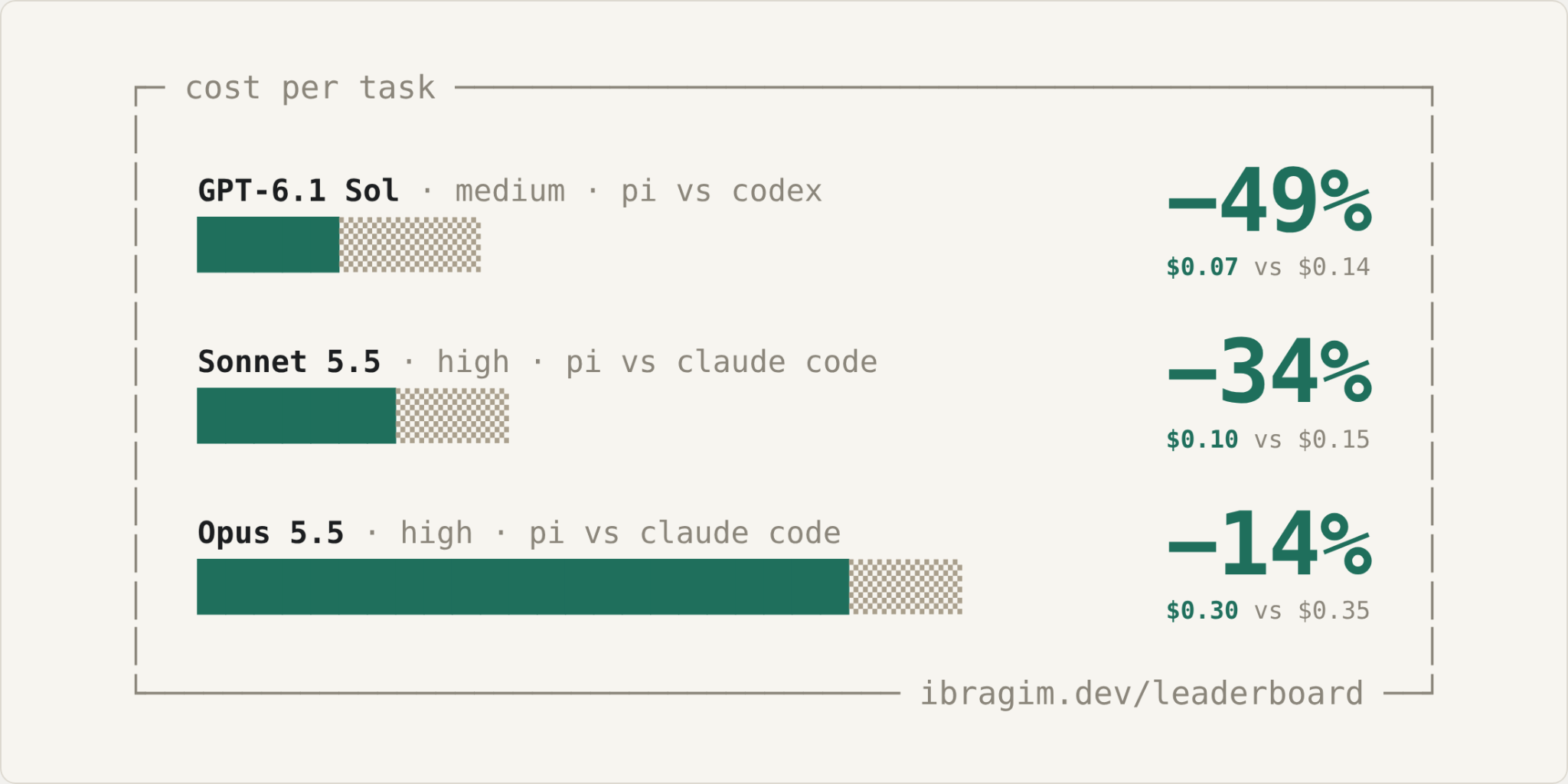
Comparing Pi and native agents on the same models. All attempts succeeded; numbers show average cost per task.
Once you have your own evals, you can test other hypotheses too. For example: do tools like RTK (which compresses command output) actually save context, and is it worth converting MCP servers into skills?
How to Build Your Personal Evals in 6 Steps
- Find tasks in your agent session history
- Turn a session into a task and decide what to tell the agent vs. what it must figure out on its own
- Package the task in Harbor (a tool for running and evaluating agents) and block ways for the agent to cheat
- Test the verifier and filter out bad tasks
- Run the evaluations and compare setups by cost and time
- Inspect the trajectories and refine the evals; repeat after new runs
I built the evals-from-sessions skill to automate much of this process (more on that at the end). GitHub
Why I Need Personal Evals When I Already Run a Public Benchmark
I work at Nebius, and for the past year and a half I’ve been building RL environments and evals for coding agents. I also maintain a public leaderboard and a large dataset called SWE-rebench (more about me at ibragim.dev). SWE-rebench shows which model is strongest across a big set of real-world software engineering tasks. Those tasks come from other projects. I also need to know which setup works best on my own tasks.
Modern models can already handle most of my daily work. I wanted to find the fastest and cheapest setup that reliably solves my tasks. Can I swap a frontier model for something fast and cheap like DeepSeek on part of my workload? Does a new skill or plugin actually help?
The idea isn't new. In a recent interview, Satya Nadella mentioned that every company should build its own private evals and hill-climb on them:

Yash Patil’s interview with Satya Nadella, June 2026 (post)
Recently, Anthropic released the build-eval and hillclimb commands for Claude Code (Anthropic post): they help you build evals for apps that call the Claude API and find a cheaper setup for them. This article applies the same idea to the coding agents you use every day.
Lightweight Setups Solve My Tasks Just as Well, but Faster and at Lower Cost
| Harness | Model | Effort | Passed trials | $ / task | Time / task |
|---|---|---|---|---|---|
| Pi | Haiku 5.5 | high | 30/30 | $0.0208 | 2:08 |
| Pi | GPT-6.1 Sol | medium | 30/30 | $0.0704 | 1:07 |
| Pi | Sonnet 5.5 | high | 30/30 | $0.0971 | 0:46 |
| Pi | Opus 5.5 | low | 30/30 | $0.1168 | 0:37 |
| Codex | GPT-6.1 Sol | medium | 30/30 | $0.1375 | 1:37 |
| Claude Code | Opus 5.5 | high | 30/30 | $0.3546 | 1:47 |
| Pi | DeepSeek-V4.1-Flash | max | 28/30 | $0.0425 | 4:30 |
A snapshot of the leaderboard. Full table at ibragim.dev/leaderboard.
I tested each configuration on 10 tasks, with three runs per task. Several configurations solved every task in all three runs, so I mainly compare them by cost and speed. These results help me choose a setup for my own work; they don’t tell me which model is best overall.
Step 1 · Find Tasks in Your Session History
I exported three months of my agent history, around 1,270 sessions. Most agents store them locally:
| Agent | Where sessions are stored |
|---|---|
| Claude Code | ~/.claude/projects/<project>/<session>.jsonl |
| Codex CLI | ~/.codex/sessions/YYYY/MM/DD/rollout-*.jsonl |
| Pi | ~/.pi/agent/sessions/ |
| Gemini CLI | ~/.gemini/tmp/<hash>/chats/ |
Some agents delete old sessions, so it’s best to back them up early. Transcripts often contain API keys and other secrets. Before sending an export to external services or teammates, I scan it with Gitleaks.
I didn’t write a parser. Instead, an agent read the session history and compiled a table of potential tasks in candidates.md. For each session, it wrote down:
- What I wanted to do
- Which files and components were touched
- Where the agent made mistakes and what had to be fixed
- How it ended
- Whether the result can be verified automatically
Then I filtered the candidates by hand. When I needed more context, I asked the agent to show a snippet of the transcript or suggest a way to test the outcome.
The most useful sessions were the ones where the agent failed at first and then fixed its work based on my feedback. My corrections often provide test cases for the verifier (the check that decides whether the agent solved the task).
I use three selection criteria:
- The task looks like my normal day-to-day work.
- There is an unambiguous way to check if the solution is correct.
- It can be moved into an isolated environment with the tools and data the agent needs to solve it.
Step 2 · Turn a Session Into a Task
Here is an example: compute-provider-cost-with-retry-fallback. The input is a log of agent runs with retries, model fallbacks, and cached-token usage. The goal is to calculate the total cost of several runs. There are a few easy places to mess up, for instance, double-counting cached tokens or using the price from the wrong attempt or model.
| Component | What it looks like |
|---|---|
| Input | Run logs with retries, model fallbacks, and token usage data |
| Goal | Calculate the cost accurately and return a structured result |
| Failure Mode 1 | Double-counting cached tokens: charging both the cache read price and the regular input price |
| Failure Mode 2 | Using the wrong attempt: taking a failed retry or the original model’s price instead of the fallback model’s price |
| Verification | Run the program on test events and compare the output. The verifier must catch both failure modes |
Before packaging the task, I decide what to include in the instructions and what the agent should discover on its own. I split the spec into three parts:
- Requirements: properties a valid solution must have.
- Failure modes: common mistakes the tests must catch.
- Must be discovered: details the agent has to find by reading the code or data.
In this task, the prompt explicitly describes the input format, pricing rules, fallback logic, and output format. It doesn’t include a ready-made implementation or hints on where to edit the code.
If you give too many hints, the task becomes mechanical. If you leave out key requirements, the verifier ends up testing things the agent was never asked to do.
Step 3 · Package the Task in Harbor
I run my tasks in Harbor, a tool for running and evaluating coding agents in isolated environments. It defines a standard task format for both evals and RL environments. Each task lives in its own folder:
my-task/
  instruction.md     # prompt for the agent
  task.toml          # metadata and runner settings
  environment/
    Dockerfile       # initial state of the environment
  tests/
    test.sh          # verifier: checks the final result
  solution/
    solve.sh         # reference solution
You can generate the template with harbor task init.
There are two ways to turn real work into a task:
- Use your own commit: the repo state before your change becomes the environment, and your diff becomes the reference solution. This preserves the real project structure and works well for private evals.
- Write a standalone task: keep the requirements and failure modes from the original session, but replace the code, names, and data. I use this approach when the code is proprietary or I want to share the task publicly. That’s how I built the cost calculation task.
Watch Out for Reward Hacking
Models know how to cheat, and you have to block them. If a task comes from a public repo, an agent might find the fix online or right inside the Git history. So I close common loopholes upfront, for example, by stripping future commits and the reference diff from the sandbox. And as silly as it sounds, I explicitly ask the agent in the prompt not to cheat and to solve the task honestly. After the runs, I use another agent to audit the trajectories (more on that in Step 6).
Step 4 · Test the Verifier and Refine the Suite
For my tasks, I use deterministic checks: I run the program and inspect file contents, JSON output, and Git state. I don't use LLM-as-a-judge. Once a verifier is written, I test it in four ways:
| Check | Expected Result |
|---|---|
| Oracle: reference solution (5 runs) | Passes every time |
| Nop: do nothing | Fails |
| Near-miss: almost right, but with one bug | Fails |
| Alternative correct: a different valid implementation | Passes |
I started with 15 tasks and did 3–5 iterations across the whole set: I refined some tasks, threw others out, and ended up with 10.
I check for two types of verifier bugs:
- False negatives (a valid solution is marked wrong): For example, a test checks for an exact substring in an error message. If the model phrases the message slightly differently, it fails the test even though the code is right.
- False positives (a broken solution is marked right): Usually happens when tests don't cover every requirement or only check part of the output.
False negatives put an artificial ceiling on model scores, for example, capping them at 80% because the remaining 20% of tasks have broken tests. False positives give models credit for incorrect solutions. This makes the results unreliable when choosing a cheaper setup.
Dead End: A 90-Minute Task Solved in One Minute
A couple of months ago, I spent an hour and a half cleaning up several Git branches and old merge conflicts. While working with the agent, I was being extra careful not to break anything. Inside the sandbox, it turned out that running git merge --ff-only across the branches one by one produced the exact same result. After the very first test runs, it was obvious the task was trivial, so I dropped it. I now use test runs to judge task difficulty.
Step 5 · Run the Evaluations
Harbor launches the agents, repeats each task, and collects the logs. It also comes with built-in agent skills. Here is an example command:
harbor run -p tasks/ -a pi -m <model> \
  --ak thinking=medium -k 3 -n 5
For each setup, I look at the outcome of every attempt, the percentage of tasks solved successfully in every one of the three runs, cost, time, step count, and token usage.
I check the logs for infrastructure errors, timeouts, and network failures, and track these separately from model mistakes.
Step 6 · Inspect Trajectories and Refine the Evals
After the runs finish, an agent reads the trajectories (the step-by-step logs of what the models did) and helps spot loopholes and verifier bugs: places where the test rejected a valid solution or passed a broken one. I review its findings, update the tasks, and fix the verifier.
After each new batch of runs, I repeat the checks from Step 4 and fix any problems before comparing setups.
A Skill for Building Your Own Evals
I built a skill called evals-from-sessions that automates this workflow: it extracts candidate tasks from your session logs, drafts specs, builds Harbor environments, and writes the verifiers. I only step in twice: to approve the task and its requirements before building, and to review the finished task before adding it to the suite. Alternatively, you can just feed this article to your agent as instructions.
GitHub: github.com/ibragim-bad/evals-from-sessions
Install via npx:
npx skills add ibragim-bad/evals-from-sessions
You can also install it as a plugin for Claude Code / Codex, or via Pi:
pi install git:github.com/ibragim-bad/evals-from-sessions
I now use these evals to compare models, agents, and tools on my own tasks. The most expensive setup wasn’t the best choice for my work.
Follow me on X (@ibragim_bad) for future posts. Questions about building your own evals, where to start, or how RL environments work under the hood? Send me a DM on X or email me at admin@ibragim.dev. Happy to chat!